The Goal
I am operationalizing local AI agents that can actually do useful work like navigating web apps, managing tickets, or automating workflows. The goal is to bridge the gap between chatting with AI and having an AI that acts as a real pair programmer, capable of executing complex tasks on a local machine.
The Challenge
The biggest hurdle is reliability. When asking an AI to handle a complex, multi-step process, it’s easy for it to get lost or hallucinate steps if it relies solely on its general training. I needed a way to keep the agent focused, ensuring it follows strict guidelines without losing the flexibility to handle new situations.
The Solution: Rules vs. Modules
To solve this, I implemented a design called the Rule-Module Architecture. Think of it as separating the “Brain” from the “Hands”:
The Rules (The Brain): High-level guidelines that tell the agent how to behave and what isn’t allowed.
The Modules (The Hands): Specific toolkits that contain the exact steps and scripts to get the job done.
By keeping these separate, the agent always knows the boundaries (Rules) while having access to deep, specific knowledge for each task (Modules).
How It Works
Looking at the architecture diagram, here is the journey the system takes for every request:
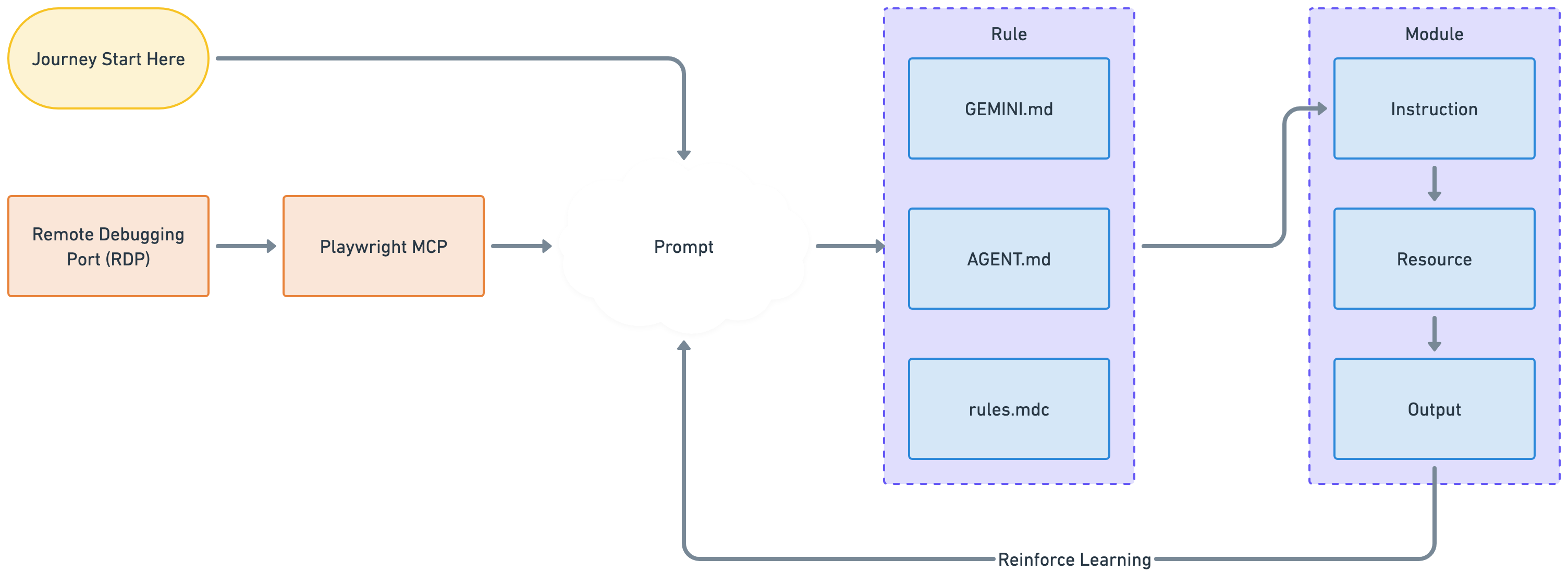
Step 1: Start & Connect
The journey begins with the Journey Start. The agent connects to the existing browser session (via the Remote Debugging Port). This is crucial because it means the agent is logged in as the user, skipping all the complex authentication steps.
Step 2: The Setup
The agent takes the request and combines it with the current context to create a Prompt. This is where the magic starts, it’s the agent figuring out “What does the user want?”
Step 3: Applying the Rules
Before acting, the agent consults the Rule block files like GEMINI.md, AGENT.md, rules.mdc).
Example: If the user asks to check Jira, I must use the official Jira module, not just browse the web at random. These files act as the guardrails to keep the agent safe and on-track.
Step 4: Executing the Module
Once the plan is set, the agent opens the specific Module for the task (e.g., the confluence folder). A module is a self-contained kit containing:
Instruction: A step-by-step guide (like a recipe or SOP) on how to perform the task.
Resource: The actual code or script (e.g., confluence.sh) that performs the action seamlessly.
Output: The result of the action (success message, error log, etc.).
Step 5: Learning
The diagram shows a loop called Reinforce Learning. The agent looks at the Output of its action. Did it work? Did it fail? This information feeds back into the system, allowing the agent to self-correct in real-time or be better prepared for the next request.
How to Adopt This
If you’re building with this system, keep these three simple principles in mind:
- Give Everything a Home: If you build a new capability, put it in a specific folder under
modules/. Don’t let code float around. - Scripts are King: Whenever possible, write a script (
resource) for the agent to run. It’s much faster and more reliable than asking the agent to click buttons in a browser manually. - Keep Rules Simple: Your rule should be a clean list of Do’s and Don’ts. Let the Modules handle the heavy lifting of How-To.